Step inside the operation. No signup.
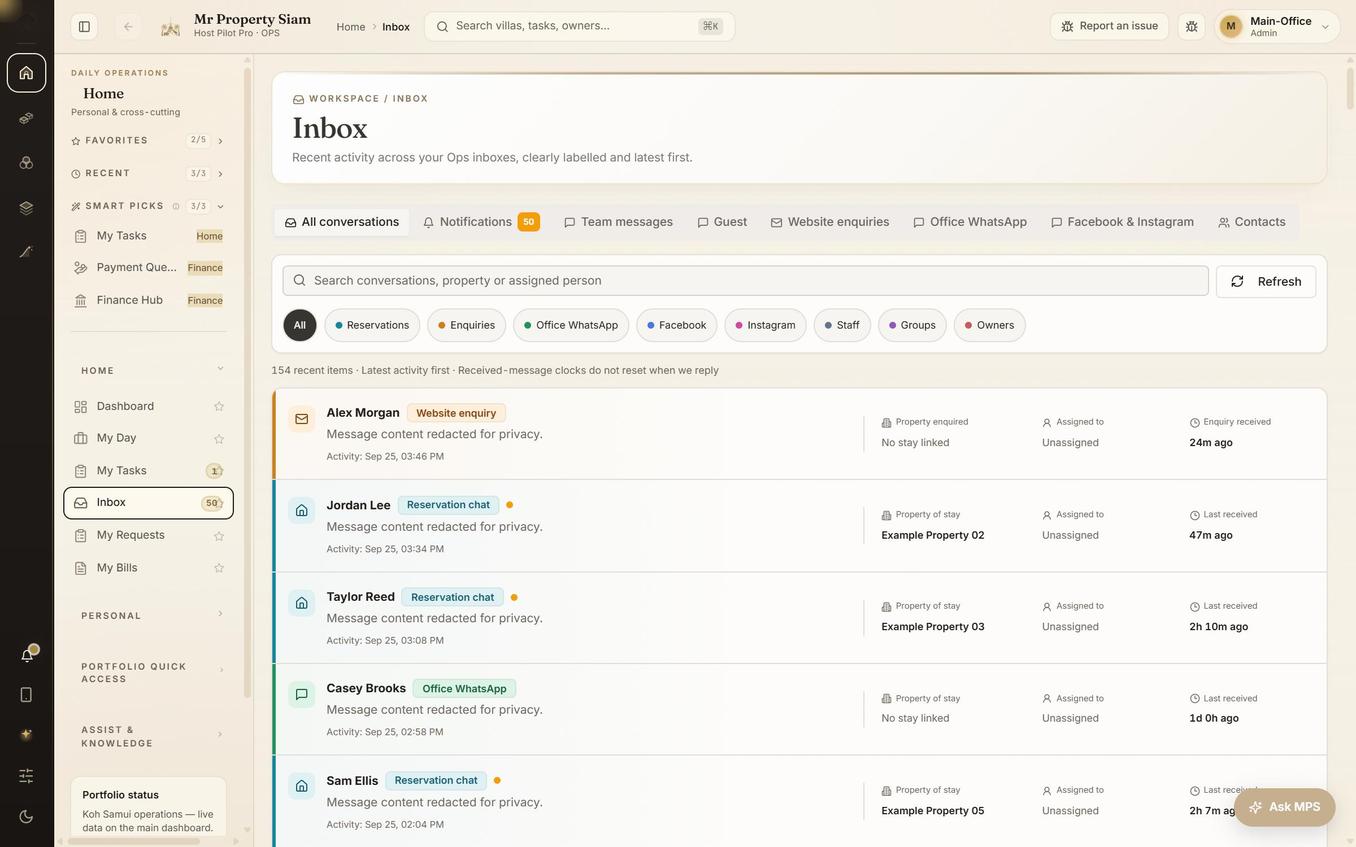
Actual screenshots from our first client, Mr Property Siam. Explore the message centre, owner ledger, finance, payroll, fuel allowance and motivational league without opening a live account.
Only sensitive data has been replaced or hidden. The application layout, branding, controls and visible statuses are unchanged.
CHOOSE YOUR PERSPECTIVE
One operation.
Four ways in.
Start with the people who matter to your business. Ops shows actual anonymised screens; the other areas are interactive demonstrations with fictional records.
HOW THE ROLES FIT TOGETHER
One stay. A whole team behind it.
A simple example of the roles each workspace supports. Your connected workflows are agreed during rollout.
- 01 · OPSCoordinate the stay
The office handles reservation context and conversations.
- 02 · FIELDPrepare the property
The on-site team sees jobs and takes responsibility for the work.
- 03 · GUESTWelcome the visitor
The guest finds arrival information and explores available extras.
- 04 · OWNERExplain the numbers
The owner reviews statement lines and relevant approvals.
Camera and smart-device scenes illustrate proposed connections. They are separate from the live workflows demonstrated here.
More than an OTA inbox.
See the actual workspace for reservation conversations, website enquiries, office WhatsApp and social channels. Source labels, property context and assignment sit alongside the conversation.
Open screenshot at full size