Find available stay windows, prepare campaign briefs and build paused ads for review. Approved campaigns can be launched through configured Google and Meta connections; track spend, clicks and provider-reported conversions.
HostPilot Ops / THE CONNECTED VILLA BUSINESS
Every villa. Every detail.
One working view.
Connect the message centre, owner finance, RatePilot, listing tools, people and property care. Keep the booking backbone you already use, then give the office and the team a shared way to run the business behind every stay.
Built at Mr Property Siam · demonstrated with sample data
See what’s included
- Message context, staff authorship and human-reviewed AI assistance
- Owner ledgers, invoices, payouts, supplier costs and verification
- RatePilot, competitor context and owner pricing boundaries
- Channel-specific listing audits, rewrites and fleet visibility
- Recruitment, staff documents, overtime, allowances and payday
- Onboarding, property records, inspections and proof of work
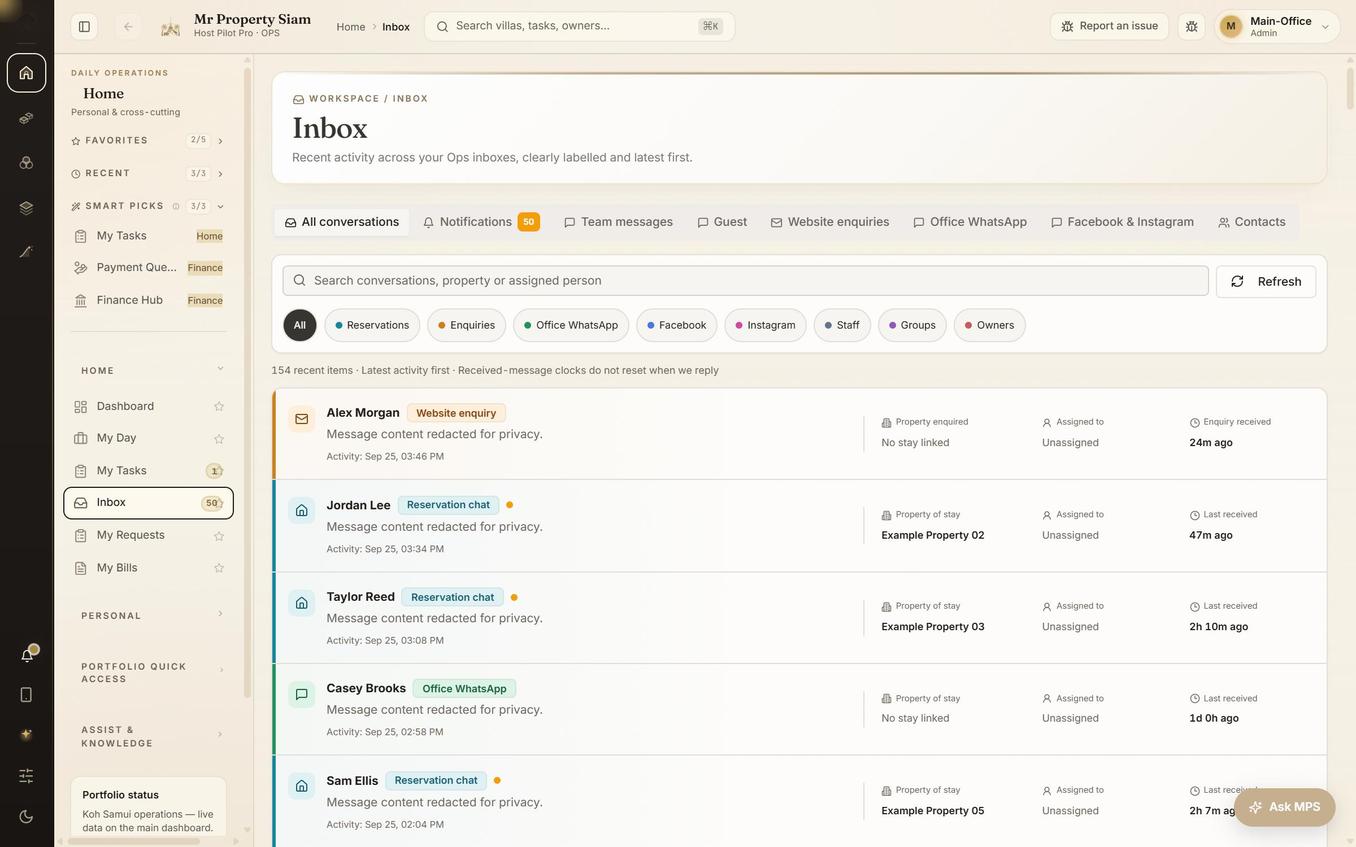
ILLUSTRATIVE SOFTWARE EXPERIENCEA shared view for your operation.
Conversations, property context and team assignment.
FROM FIELD WORK TO THE FINANCE WORKSPACE.
The screen shows the actual anonymised Ops interface. The update card is illustrative. Bill-scanning examples below require review before submission and approval.

HOSTPILOT BILL SCANNER
Ready for review
SupplierIsland Pool Supplies
Amount฿2,450.00
PropertyVilla Azure
Illustrative workflow · sample dataFROM PAPER TO A PROPER RECORD
Point. Capture.
Keep the evidence.
Less typing. Fewer missing receipts. A bill scanner built into the operation, with a review step that keeps the team accountable.
Your team stays in control.
Check the supplier, amount, category and villa. Correct the extracted information before it enters the approval workflow.
HostPilot Pro in use · Mr Property Siam
More than an OTA inbox.
See the actual workspace for reservation conversations, website enquiries, office WhatsApp and social channels. Source labels, property context and assignment sit alongside the conversation.
Open screenshot at full sizeGo deeper
The working details.
Open the area that matters to your operation, from cash controls and pricing to the people doing the work.
Fill the gaps. Keep the conversation connected.
Bring campaign planning, guest communication and the daily operation into the same working context.
Turn selected villas, real photos and booking links into editable newsletters. AI helps write and revise the draft; your team previews it, chooses the audience and approves sending.
Prepare artwork, captions and community-post drafts around actual availability. Download content for manual posting; community-group publishing stays with your team.
Keep supported one-to-one conversations, incoming files and property context together. Configured office accounts support reviewed text replies within the provider’s messaging window.
A supplier pilot connects orders, delivery photos, quantities, bills and payment evidence. Activate and test the workflow with each participating supplier.
Configured social capture brings incoming messages into the office view. Receiving messages and publishing ads are separate capabilities; social inbox replies are not currently supported.
Two keystrokes to any record.
Field-facing software fails on friction. If a coordinator needs four clicks and a filter to find a villa mid-phone-call, they stop using the system and go back to WhatsApp.
Press ⌘K anywhere, type three letters of a villa or a code, hit enter.
Six domains in the rail, and only the sub-navigation for the one you are in.
The five screens a given role opens every day sit at the top of their sidebar.
Any villa, task or statement is a URL you can paste into a message.
Work that leaves a record.
Every task closed in the field becomes evidence in an owner statement later. That is the connection most operations tools do not make.
Cleaning, pool, garden, maintenance and inspection each have their own rhythm and their own board.
A closed clean carries images and a timestamp. Disputes end quickly.
Backlog is never hidden inside today’s number to make the dashboard look calm.
Drill into a department and move a day’s work in one pass.
The unglamorous half.
Villa management is a cash-handling business. Petty cash, guest recoveries, staff overtime and supplier bills are where margin quietly disappears.
Draft, review, close, issue. Owner balances stay visible to staff for review only.
Receipts photographed in the field land in the finance queue the same hour.
Laundry, cleaning, pool and garden income separated from the management fee.
The open month is an estimate. The product says so on the tile.
RatePilot: recommendations, with a human in the way.
A pricing engine that changes your rates on its own is a fast way to lose an owner. RatePilot reads the calendar and proposes; staff decide; owners can be asked before anything moves.
Thousands generated so far in our own portfolio, filterable by villa and window, with the reasoning attached to each one.
A recommendation only reaches Hostaway when someone accepts it, and strict mode never pushes at all.
The approve-and-decline flow and the owner digest exist in the product. In our own data almost nothing has been pushed and no digest has gone out yet, so we call it rate recommendations with owner approval — not automated pricing running your portfolio.
Operational ledgers and owner statements.
This is the oldest and most-used part of the system, because it is the part an owner reads. Statements are assembled from reservation and task records rather than typed into a template.
Every booking carries its own ledger lines — revenue, commission, fees, recoveries — so a statement line can always be traced back to a stay.
Draft, review, close, issue. Hundreds of statements and thousands of line items in daily use inside our own operation, with stored PDFs.
Owner balances, payout records and exports your accountant can work from.
An operational ledger and owner statements. Not double-entry general-ledger accounting, and not bank reconciliation.
Petty cash and the cash drawer.
Villa management runs on cash in envelopes, and that is where margin disappears quietly. This is the least glamorous screen in the product and one of the most used.
Issue a float, see the balance, reconcile it. Every movement has a name on it.
The photo lands against the transaction, not in a WhatsApp thread.
Opening, closing, staff advances and cash handed back to the office are all logged.
Floats, hundreds of transactions, drop-offs and drawer events in our own live data.
AI listing audits and rewrites.
Point it at a listing and it scores the title, the photos order and the description, then writes a better version you can accept or ignore.
Sourced from Airbnb or from Hostaway, saved so you can see what changed and when.
The suggested content is a draft. Pushing it to Hostaway is a deliberate action.
The same audit across the portfolio, so you can see which villas are underdressed.
Dozens of audits saved so far, not thousands. It is AI listing audits and rewrites — not autonomous multi-channel optimisation.
Staff records and document expiry tracking.
Villa operations run on work permits, visas and immigration paperwork, and the cost of missing one is not a fine — it is a person who cannot work tomorrow.
Roles, departments, contracts and payroll inputs for the whole team.
Passport, visa, work permit and immigration documents stored with their expiry dates against each person.
The console shows what is expiring and how soon.
The notification code exists, but no expiry reminder has demonstrably fired in our production data. So this is document expiry tracking. We are not promising that we will email you before a work permit runs out until we can show you one that did.
Internal collaboration and a broader message centre.
Keep department conversations and job context, then bring supported guest, office and enquiry sources into the wider office workflow. Preserve who wrote a reply, who owns the work and who reviews the next action.
Housekeeping, pool, garden, maintenance and office, with membership managed like any other record.
An alert points at the task, statement or villa it came from.
Source coverage depends on the connected provider and activation state. Human review remains important, and a receive-only integration is not advertised as a two-way inbox.
A tours and transfers business, run from the console.
The guest-experience catalogue is not a bolt-on list — it is a product engine in the Growth hub, with editors, pricing and per-villa control over what each guest is shown.
55 active experiences, and a matrix that decides which of them appear at which villa. Across the portfolio that resolves to more than five thousand villa-and-experience combinations, with explicit per-villa overrides on top.
610 taxi rates across 10 destinations. A transfer from a villa in Bophut is not priced like the same trip from Taling Ngam, and the system knows.
Named editors maintain the catalogue and its photography; separate views cover orders, sales and insights. A commission-rules engine is in place.
Guests request; the office confirms. There is no instant supplier confirmation, no commission history recorded in production yet, and no external sync running today.
Recruitment to payday, with the working details included.
A staff directory is only the beginning. Keep the employment journey connected to the work, the evidence and the pay review.
Applications, CVs, contracts and staff records belong in a connected workflow.
Review one payee at a time, with salary, approved overtime, allowances and previous advances visible.
Make contributions and bonus goals visible. Approved pay, league standings and reward accounting are not the same thing.
Track staff documents and expiry dates. Confirm the configured reminder recipients and delivery path during onboarding.
THE GROWTH WORKSPACE
Great villas deserve
to be seen.
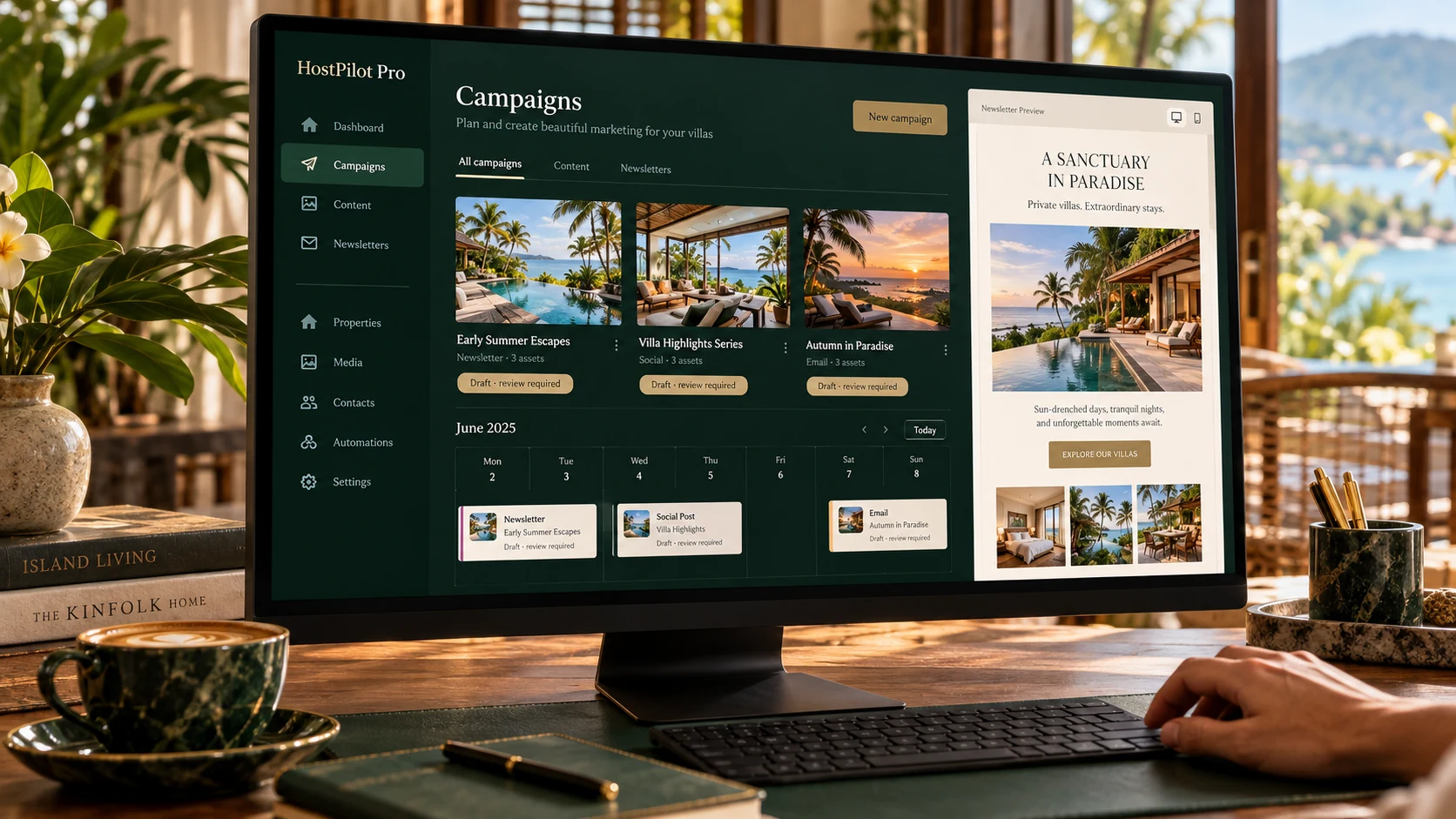
Paused draft · review required
THE MARKETING LAYER AROUND YOUR VILLA OPERATION.Villa Azure · a seven-night opening
A fictional campaign brief, built around an available stay window.
ILLUSTRATIVE PREVIEW · NO LIVE CAMPAIGNTurn an open stay window into a campaign brief.
Use available nights as the starting point. Prepare Google and Meta campaign drafts, review the creative and budget, then approve actions through configured provider connections.
- Channels
- Google & Meta
- Proposed budget
- ฿3,000 · sample
- Publishing
- Approval required
- 1Stay window
- 2Creative & budget
- 3Review
- 4Approved action
Review stays in the workflow. Drafting content does not publish an ad, spend a budget or send a newsletter.
Scenes and sample budgets are illustrative. Credentials, provider permissions, audience selection and approval are required before live actions. Provider-reported conversions are not independently verified bookings.
Not shipped yetThe capabilities in this section are planned.
What’s next.
Explore the next capabilities in the ecosystem. These are separate from the working product; we will confirm scope and availability before including them in your rollout.
- In buildSegregated owner trust accounts
Owner money held in a separate account from the management company’s operating cash, with the ledger and the bank balance reconciling to each other. Today HostPilot records the payout; the bank still moves it.
- NextGuesty and Lodgify connectors
HostPilot is Hostaway-native today, and Hostaway is the only channel manager it syncs with. Guesty and Lodgify adapters are next. If you are on either one, you cannot subscribe and connect this week — ask us where the queue is.
Straight answers
What this does not do.
Every platform in this category oversells. Here is where the line is, so you do not find out on week three.
- It is not a channel manager. Distribution, rates on the OTAs and inventory sync stay with Hostaway.
- It is not a full accounting ledger. It produces the operational truth your accountant works from.
- There is no built-in website or booking engine. Direct bookings arrive through your existing stack.
- RatePilot does not run your pricing unattended. It proposes; a person accepts; strict mode never pushes.
- Document expiry reminders are not proven. The dates are tracked and visible; we will not promise an email until one has demonstrably sent.
- The combined message centre uses supported, configured sources. It is not a full Gmail replacement or WhatsApp group archive; social capture and outbound support have separate activation boundaries.
- Tour and transfer requests are confirmed by your office, not auto-confirmed with the supplier.